
AICC
AI Coding Companion: a home base for working with AI coding agents.
WIP Coming soon macOS
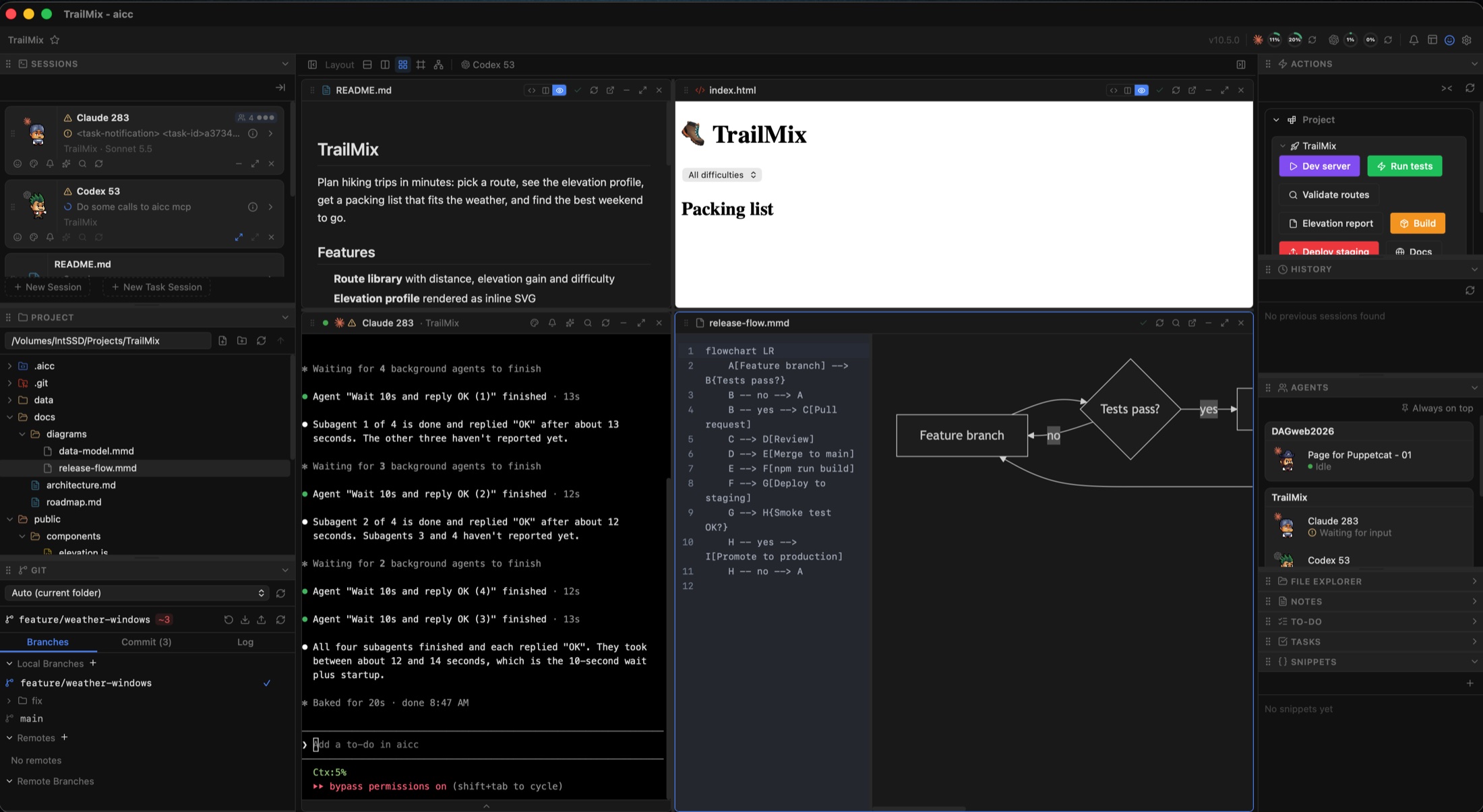
AICC is a project-centric desktop app I'm building for my own daily work with AI coding agents like Claude Code and Codex. Instead of juggling terminals, a file manager, a git client and a task board, everything for a project lives in one window, and the agents can reach into it too. It's still a work in progress, with a public release planned.
Screenshots
What it does
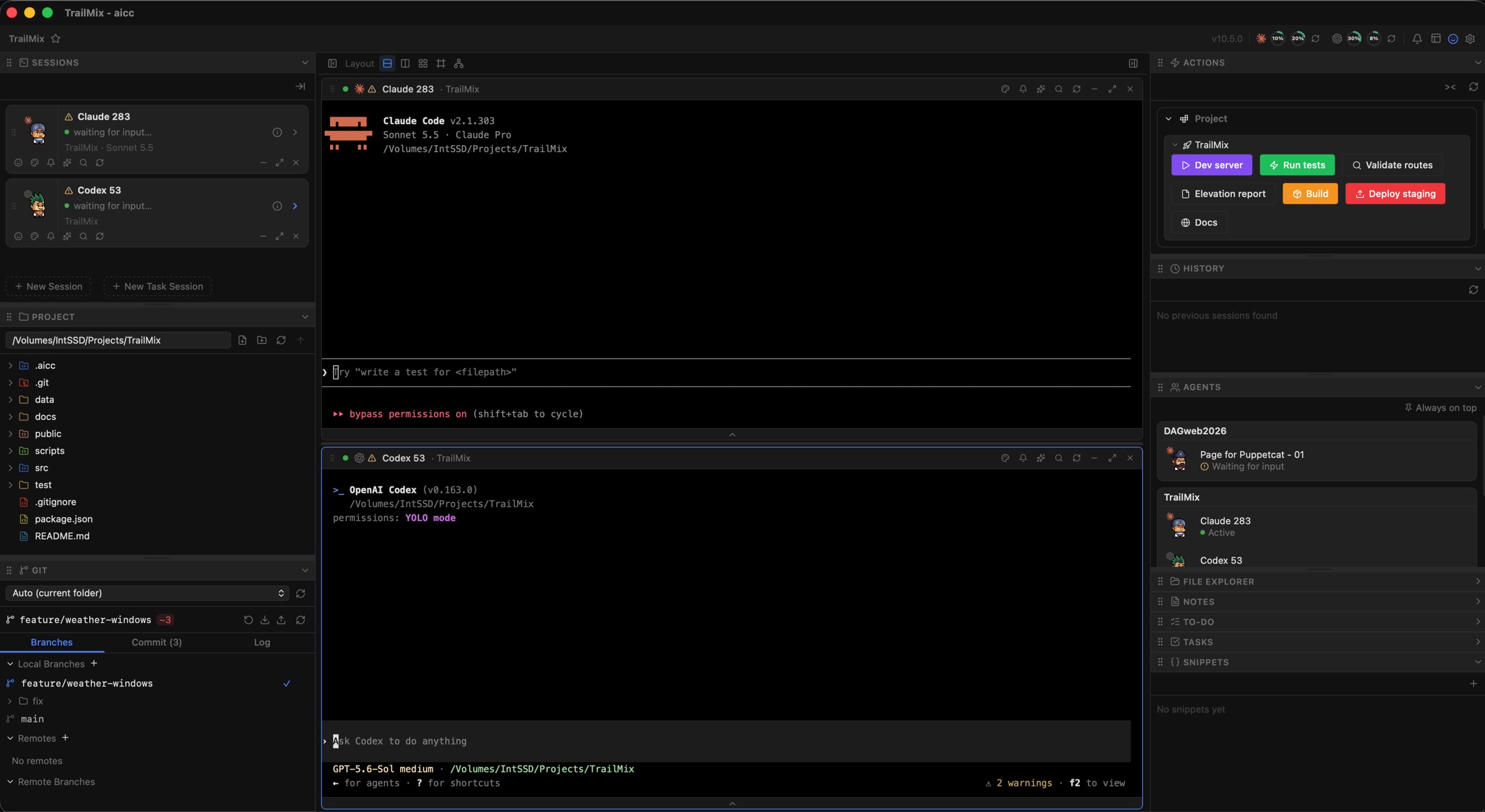
- Agent sessions Run several Claude or Codex sessions side by side in real terminals, see which agent is busy or waiting, and browse past session history.
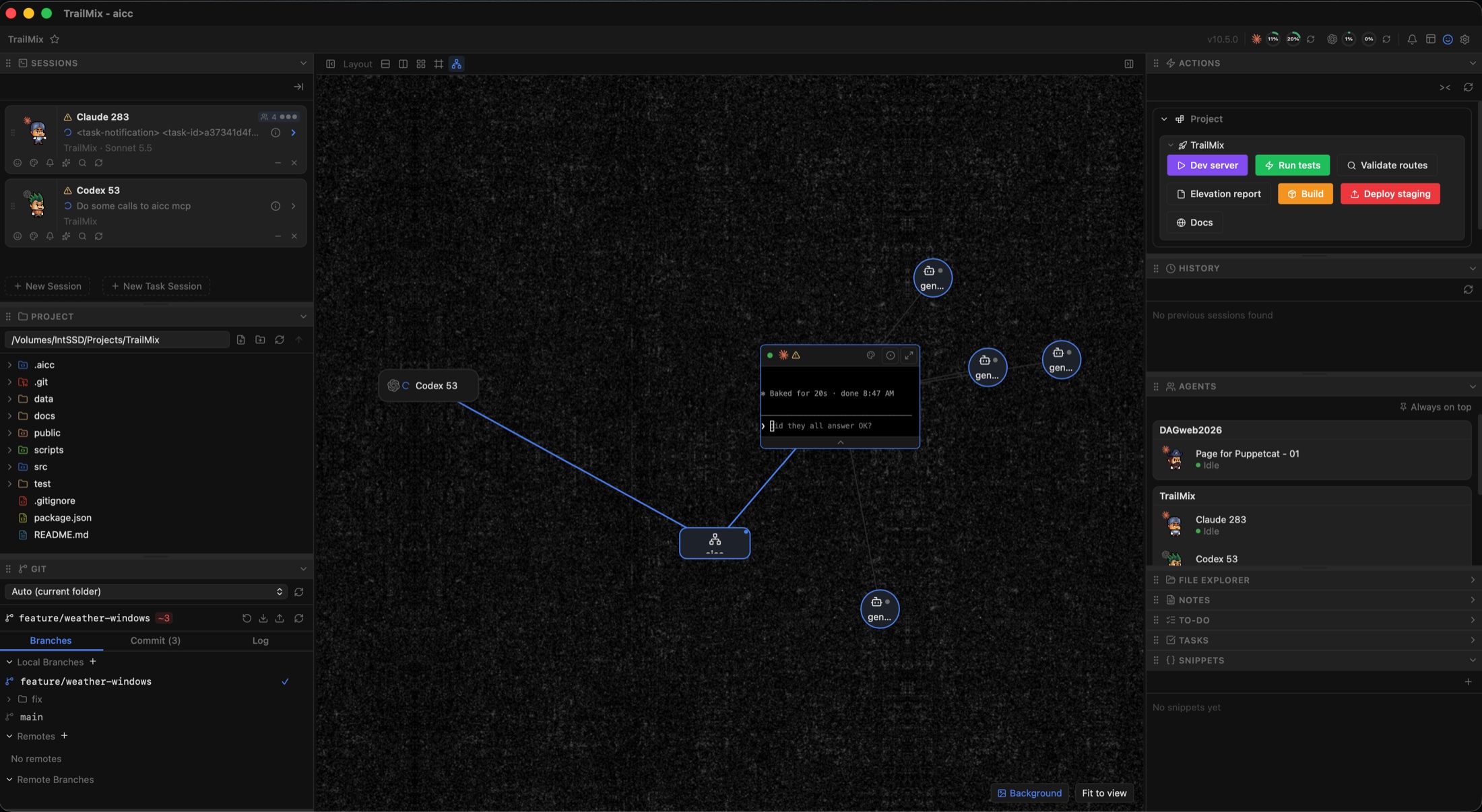
- Agent canvas See sessions and the sub-agents they spawn as a live graph, and open any of them from there.
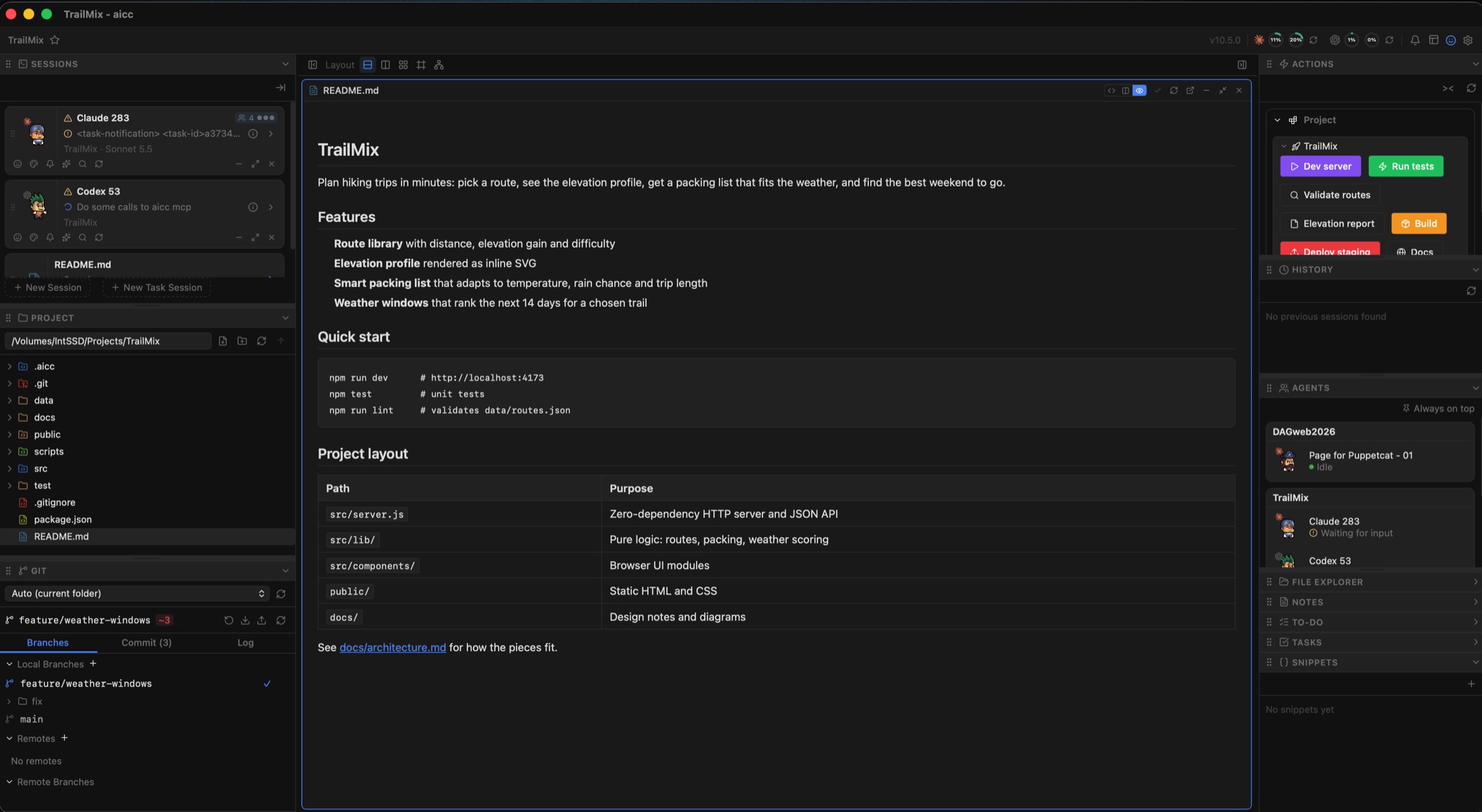
- Files and editors A project file tree with built-in code and markdown editors, including Mermaid diagram preview.
- Git, built in Branches, staging, commits, diffs, stash, merge, rebase and a history graph without leaving the window.
- Quick Actions One-click buttons defined in plain JSON files: run a command or script, open a URL, or send a prompt to an agent.
- Tasks from anywhere A plugin system that brings tasks from GitHub, GitLab, Jira and other trackers into one panel.
- Notes, to-dos and snippets Shared project memory for you and your agents.
- Agent-aware (MCP) AICC exposes its notes, tasks and launcher buttons to agents over MCP, so they can read and update them.
- Dockable layout Drag panels between columns; the layout is remembered per project.
Every panel
Panels can be dragged between columns, reordered, and shown or hidden from the View menu.
Sessions
Your agents, front and center. Every Claude Code or Codex session lives here.
- See at a glance whether each agent is working, waiting for input, or waiting for your approval
- Start a new session, or a task session tied to a specific piece of work
- Custom session buttons: pick the agent, working directory, extra command-line arguments and which MCP servers to attach
- Rename sessions with a double-click, drag to reorder, and open any session in its own full panel
- See which git worktree a session is in and how many sub-agents it has running
- Task contexts: named, shared notes that you and your agents can both read and update
Terminals
Real terminals for every session, not a chat imitation.
- Full terminal rendering with search (Cmd+F), copy, jump to bottom, and click-to-open for files and links
- A prompt composer to draft longer prompts and send them with Cmd+Enter
- A rich transcript view of what the agent has been doing
- Drag to reorder, minimize, and close sessions
- Token usage breakdown per session: input, output, cache read, cache write and total
Project
A file browser for the project you are working in.
- Lazy-loaded file tree that updates as files change on disk
- Create, rename and delete files and folders (deleting moves to the trash)
- Copy absolute or relative paths, and set any folder as the new root
- Open in the built-in editor, in a separate window, in Finder, in a terminal, or with any app on your Mac
- Drag files into a prompt to hand them to an agent
- Home-directory shortcut for quick jumps
Git
A complete git client, so you rarely need to leave the window.
- Pick the repository automatically from the current folder, or from favourites, recents and a scan of nearby repos
- Branches tab: local and remote branches, create, check out and delete branches
- Commit tab: modified and unversioned files, stage and commit with a message, and add files to .gitignore
- Fetch, pull and push, plus remotes you can add, edit or remove
- Merge, rebase, stash and stash apply/pop
- Worktrees: create and remove them from the panel, with a custom location if you like
- Clone a repository straight from the launcher
Git log
History you can act on.
- A commit graph with every branch
- Open any commit to see the changed files, and open a file to see its diff
- Cherry-pick, revert, or reset (soft or hard) to any commit
- Create a branch from any commit, and copy full or short hashes
- Working-tree diffs for files you have not committed yet
Actions
One-click buttons that you define in plain JSON.
- Run a command, run a script, or open a URL
- Show the output inline, or run it in an interactive terminal for dev servers and watchers
- Project buttons live in the repo and global buttons follow you everywhere
- Custom colors and icons from a built-in set, your own SVGs, or emoji
- Agents can write these buttons for you
History
Every past Claude and Codex session for the project.
- Browse previous sessions with their titles, and rename them
- Read the full chat history of any session
- Resume a session, or resume it with permissions bypassed
Agents
An overview of every agent across all your projects.
- See what each agent is doing, grouped by project, and jump straight to a session
- Pop it out into an always-on-top window with adjustable opacity
- Optional pixel-art characters give each session its own little personality
Tasks
Your tracker, inside your workspace.
- Pulls tasks from GitHub, GitLab, Jira or any other source you add with a plugin
- Open a task to read its description, subtasks and comments, and see status, priority, labels, assignees and due dates
- Send a task to an agent: straight to the terminal, or into the prompt composer first
- Turn a task into a shared context for a session, or open it in the browser
To-do
A quick checklist for the project.
- Add items, edit them with a double-click, drag to reorder, and delete
- Agents can add and tick off items too
Notes
A free-form scratchpad for the project, saved with it.
- Plain text notes that agents can read and append to
Snippets
Code and text you reuse.
- Save titled snippets with syntax highlighting for many languages, including JavaScript, TypeScript, Python, Rust, SQL, HTML, CSS, JSON, YAML and Markdown
- Edit them in place, rename and delete, and let agents add their own
Everything else
Layouts
Arrange the workspace your way.
- Terminals in rows, in columns, or in a grid
- A free-form canvas where you drag and resize windows anywhere
- A graph view that draws sessions and their sub-agents as connected nodes
- Dockable panels: drag them between the left and right columns, reorder them, and hide the ones you do not need
- Layout and panel positions are remembered per project
Built-in editors
Edit and preview without switching apps.
- Code editor with syntax highlighting and search for many languages
- Markdown with a rendered preview
- Mermaid diagrams with a live preview
- HTML with a live preview
- Notices when a file changes on disk, so you never overwrite an agent's work by accident
- Open any editor in its own window, or move it back to the main window
Launcher
Pick up where you left off.
- A project picker with your recent projects
- Clone a git repository and open it in one step
- Open the current folder from any terminal with the
aicccommand
Notifications
Know when an agent needs you.
- Desktop notifications when an agent finishes or needs your input or approval
- An optional sound, and banners only while the window is in the background
Usage tracking
Keep an eye on your limits.
- Live usage badges for Claude and Codex with refresh buttons
- Per-session token breakdowns
Agent integrations
AICC works with your agents, not just alongside them.
- A built-in MCP server that lets agents read and write notes, to-dos, snippets, tasks and shared contexts
- Agents can create quick-action buttons, session buttons and MCP catalog entries
- A /aicc skill so Claude Code and Codex can open the app in their working directory
- Status hooks that report what an agent is doing live: thinking, running a tool, or waiting
- A catalog of MCP servers you can attach to individual sessions
Settings
Everything configurable in one place.
- Actions folder, custom sessions, MCP catalog, task plugins and notifications
- Git preferences and macOS permissions for agents running in the terminal
- One-click install of the command-line launcher, agent skills and hooks
MCP catalog and per-session MCP
MCP servers give agents extra abilities, but loading every server into every session is noisy and slow. AICC keeps one shared catalog of servers and lets you choose, session by session, which ones an agent gets.
One catalog for every project
Manage your servers once in Settings, and use them anywhere.
- Add, edit and delete servers in Settings with a simple form
- Supports local servers (a command with arguments and environment variables) and remote HTTP servers (a URL with optional headers)
- The catalog is separate from your Claude and Codex config files, which AICC never touches for catalog entries
- Agents can manage the catalog too: list, add, update and remove servers over MCP
Pick servers for each session
Start a session with exactly the tools it needs.
- The session composer shows a checkbox for every catalog entry, next to the agent, working directory and extra arguments
- A live command preview shows exactly what will run before you launch
- Works the same for Claude Code and Codex: AICC passes the servers using each tool's own per-session mechanism
- Nothing is changed permanently, so the next session starts clean
Save it as a button
Turn a good setup into a one-click launcher.
- Save the agent, folder, arguments and server picks as a named session button, such as "Claude + docs MCP"
- Buttons are available per project or globally
- Buttons store your choices, not a frozen command, so later catalog edits carry through automatically
- Sessions restored after a restart get their servers re-attached
Additive by design
Predictable, and it never breaks your existing setup.
- Picked servers are added on top of whatever Claude or Codex already has configured
- If a server is renamed or deleted from the catalog, saved buttons skip it instead of failing
- Starting a session with no picks leaves the agent's normal configuration untouched
Under the hood
AICC is a Tauri 2 app: a Rust backend handles terminals, git (libgit2), the file system and session history, and a React and TypeScript front end renders the interface. It's designed to run on macOS, Linux and Windows, with macOS as my daily driver.
Status
AICC is in active development and not available for download yet. I use it every day to build my other projects, including PuppetCat and this site. Check back soon, or get in touch at dag@dag.cl.